Morse Code Audio Translator
Use the tool below to speak into your microphone or upload Morse audio, then review, play, and refine the results in your browser.
If you’ve ever looked at dots and dashes and thought, “I get the idea, but what does it actually sound like?”, you’re in the right place.
Many learners find they make the most progress when practising Morse through sound rather than visual patterns. That’s exactly why I recommend using a Morse code audio translator.
With this free tool, you can type plain text and hear it as authentic Morse beeps, paste Morse and play it back to check your timing, practise letters and common signals, and learn the rhythm the way real operators do. No downloads. No sign-ups. Just type and listen.
What is a Morse Code Audio Translator?
A Morse code audio translator converts either text to Morse audio or Morse symbols to playable timing patterns. The system transforms a message like HELLO WORLD into a sequence of Morse sounds:
- Dots (dits): short tones
- Dashes (dahs): longer tones
- Gaps: silent pauses that create the language of Morse
What makes audio special is that Morse is fundamentally a timing-based system, not a visual one. You don’t truly know Morse until your ear starts recognising sound patterns without consciously translating each letter.
How To Use Morse Code Audio Translator
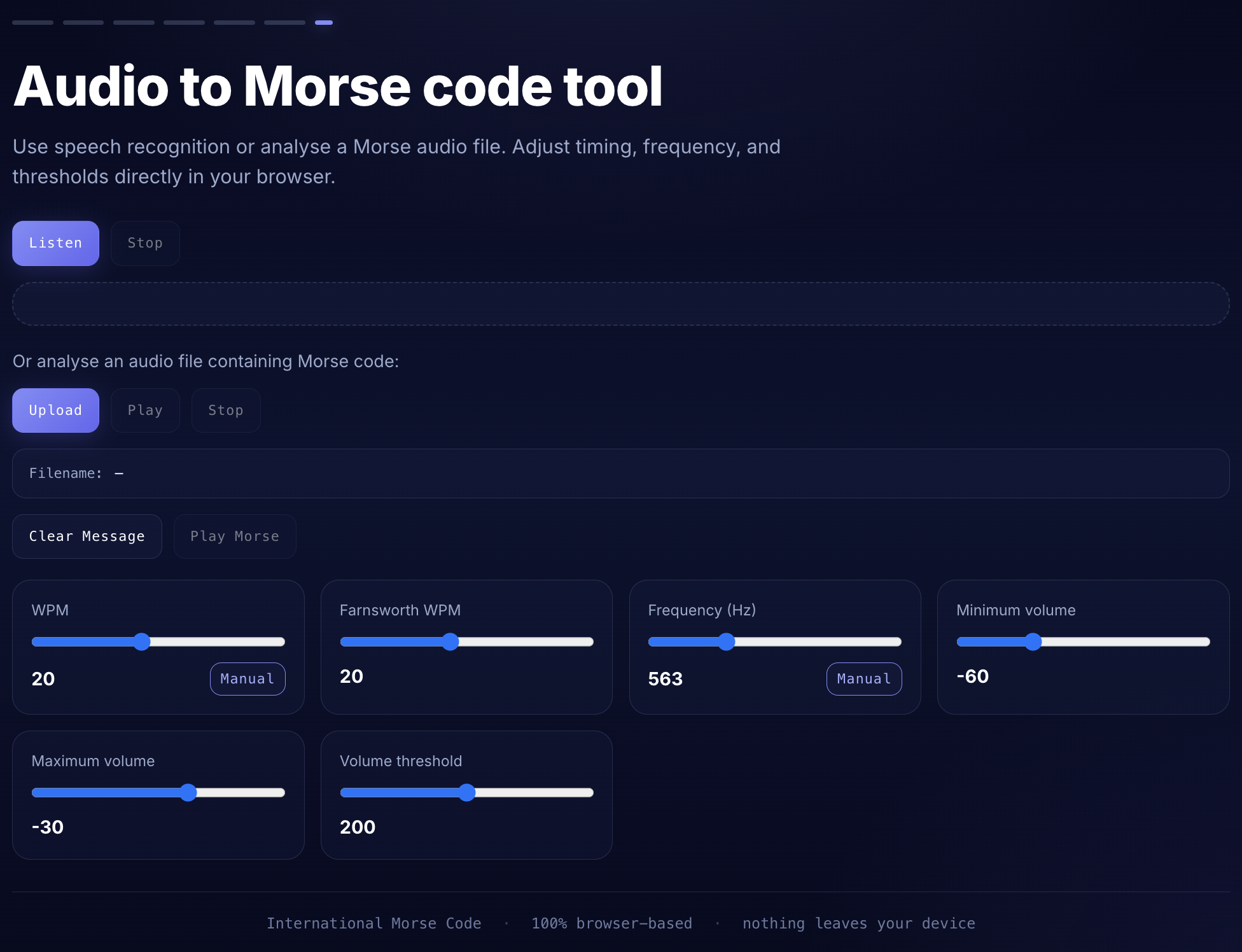
- Choose your input method. Press Listen to use your microphone and speech recognition, or press Upload to analyse an audio file containing Morse code.
- Speak or upload clearly. If you use the listen mode, speak naturally and let the tool capture your words. If you upload a file, choose a clear Morse recording with minimal background noise for better decoding.
- Adjust the controls if needed. Use WPM, Farnsworth WPM, Frequency (Hz), Minimum volume, Maximum volume, and Volume threshold to fine-tune playback and uploaded-audio analysis.
- Review the output. The tool will show the recognised text and Morse code so you can compare, practise, or verify the result immediately.
- Play, copy, or clear. Use Play or Play Morse to hear the audio, use Copy to save the text or Morse output, and use Clear Message to reset the tool for the next test.
Why convert Morse code to audio?
Most people start by memorising Morse visually. That works for a few characters, but it breaks down fast when you try to go faster. Audio practice builds what operators often call the Morse ear, where you recognise the sound pattern directly.
| Use case | Why audio helps |
|---|---|
| Learning | Your brain recognises rhythm faster than it recalls dot-dash drawings. |
| Practice | Ideal for CW training, mock tests, and speed-building. |
| Verification | You can confirm your Morse is correct by hearing it played back. |
| Education | Great for classroom demos and STEM history lessons. |
| Hobby | Useful for puzzles, geocaching, jewellery messages, and maker projects. |
| Emergency basics | Learning SOS and a few key patterns can be genuinely useful. |
Morse code timing rules
Morse isn’t just dots and dashes. It’s precise timing. If you get spacing wrong, letters blur into each other. Here are the standard International Morse timing rules.
| Element | Units |
|---|---|
| Dot (dit) | 1 |
| Dash (dah) | 3 |
| Gap between dits/dahs inside a character | 1 |
| Gap between letters | 3 |
| Gap between words | 7 |
Morse Code alphabet (A to Z)
If you’re practising, learning sound patterns in pairs helps because they reinforce each other.
| Letter | Code | Letter | Code |
|---|---|---|---|
| A | .- | N | -. |
| B | -... | O | --- |
| C | -.-. | P | .--. |
| D | -.. | Q | --.- |
| E | . | R | .-. |
| F | ..-. | S | ... |
| G | --. | T | - |
| H | .... | U | ..- |
| I | .. | V | ...- |
| J | .--- | W | .-- |
| K | -.- | X | -..- |
| L | .-.. | Y | -.-- |
| M | -- | Z | --.. |
Practical note: E and T are the shortest because they’re among the most common letters in English. Morse was designed for efficiency.
Morse Code numbers (0 to 9)
Numbers are highly structured and easier once you spot the symmetry.
| Number | Code | Number | Code |
|---|---|---|---|
| 1 | .---- | 6 | -.... |
| 2 | ..--- | 7 | --... |
| 3 | ...-- | 8 | ---.. |
| 4 | ....- | 9 | ----. |
| 5 | ..... | 0 | ----- |
Common punctuation in Morse code
| Symbol | Code |
|---|---|
| Period . | .-.-.- |
| Comma , | --..-- |
| Question mark ? | ..--.. |
| Apostrophe ‘ | .----. |
| Exclamation ! | -.-.-- |
| Slash / | -..-. |
| Hyphen - | -....- |
| Parentheses ( ) | -.--.- |
| Colon : | ---... |
| Semicolon ; | -.-.-. |
| Equals = | -...- |
| Plus + | .-.-. |
| At @ | .--.-. |
Common Morse audio examples you can try right now
These are strong starter inputs because they have memorable rhythms.
| Text | Morse |
|---|---|
| SOS | ... --- ... |
| OK | --- -.- |
| HELLO | .... . .-.. .-.. --- |
| YES | -.-- . ... |
| NO | -. --- |
| LOVE | .-.. --- ...- . |
If you’re brand new, play SOS until you can identify it instantly. That rhythm becomes a reference point for everything else.
Text to Morse Code Audio features
I evaluate Morse audio tools according to the same criteria I use to assess real listening exercises: clear sound, accurate timing, and a simple interface that makes practice easy.
- Instant conversion: type and play immediately.
- Supports learning and checking: enter text to encode or enter Morse to play it back.
- Clear tone: most learners do best around 600–800 Hz, but this tool lets you adjust pitch.
- Works on desktop and mobile: practise in any modern browser.
- Free and privacy-friendly: no account needed.
- Downloadable practice: export MP3 audio when you want a file to keep.
Who uses a Morse code audio translator?
| Audience | Typical use |
|---|---|
| Students | Communication history, wartime technology, and signal projects. |
| Amateur radio operators | CW practice, callsign drills, and on-air confidence. |
| Scouts and Guides | Badge work and basic signalling skills. |
| Teachers | Interactive classroom demonstrations. |
| Puzzle solvers | Escape rooms, ARGs, and geocaching clues. |
| Film and game creators | Authentic sound design and props. |
| Makers | Arduino projects, LEDs, buzzers, and training kits. |
| Preparedness learners | Backup signalling basics like SOS and short phrases. |
Morse code audio and UK amateur radio
From hands-on experience in the community, CW practice still matters because narrow-band Morse can remain readable when voice fails, it works efficiently with modest equipment, and it is still a living tradition. Many UK clubs continue to run CW sessions, and organisations like the RSGB still promote training resources and operating skills.
How Morse code speed works
Morse speed is measured in WPM (words per minute). The standard reference word is PARIS, chosen because it represents a typical word length in Morse timing.
| Level | WPM | What it feels like |
|---|---|---|
| Beginner | 5 to 10 | Enough time to think; good for fundamentals. |
| Improving | 12 to 18 | Recognition starts replacing counting. |
| Comfortable | 20+ | You hear patterns as sounds, not dots and dashes. |
| Advanced | 30 to 40+ | Fast conversational CW for experienced operators. |
Tips for learning Morse code with audio
- Start with the highest-frequency letters. Learn E, T, A, O, I, N, S, H, and R first.
- Practise daily. Aim for 10 to 15 minutes rather than long, tiring sessions.
- Learn the sound, not the symbol. Hear A as one pattern rather than consciously counting dot-dash.
- Use real-life inputs. Try your name, your callsign, or short words like THE, AND, YOU.
- Use a simple two-week restart plan.
| Days | Focus | Practice ideas |
|---|---|---|
| 1 to 3 | E, T, A, N | E T A N, TEN, ANT |
| 4 to 7 | I, M, S, O | IS, SO, AIM, MOON |
| 8 to 10 | R, H, D, K | HER, HARD, DARK |
| 11 to 14 | Numbers 1 to 5 | 1 2 3 4 5 and simple mixes |
Frequently Asked Questions
How do I convert text to Morse code audio?
Type your message into the input box and press Play. The tool instantly converts each character into Morse timing and plays the audio.
Is this Morse code audio translator free?
Yes. You should be able to use it without accounts, trials, or feature locks.
Can I download the Morse audio?
Yes. This translator includes MP3 export, so you can save a practice file after generating your message.
What does SOS sound like in Morse code?
SOS is ... --- ... In audio, it’s three short beeps, three long beeps, and three short beeps. It’s designed to be unmistakable.
What speed is the audio?
This tool lets you adjust playback speed in WPM and use wider Farnsworth spacing so beginners can learn without losing character rhythm.
Can this tool convert Morse audio back to text?
This page is focused on encoding text to Morse audio and playing Morse symbols. Audio-to-text decoding needs a different kind of tool that analyses incoming sound, background noise, tone frequency, and timing variation.
For more practice, see our guides on how to learn Morse code, how Morse code works, Morse code letters, and Morse code numbers.